ICU documentation consumes an extraordinary share of a clinician’s working hours. Studies consistently report that intensivists spend 40–50% of their shift on documentation — charting vitals, writing progress notes, calculating severity scores, compiling discharge summaries, and documenting procedures. That is time taken directly from patient assessment, clinical decision-making, family communication, and teaching. The documentation burden in critical care is not a minor inconvenience — it is a systemic problem that contributes to physician burnout, delays in care, and paradoxically, lower-quality records produced under time pressure.
This guide presents practical, evidence-informed strategies for reducing ICU documentation time without compromising the completeness, accuracy, or medicolegal robustness of clinical records. These approaches work across healthcare systems — whether you are in a high-resource academic ICU or a busy district hospital with limited digital infrastructure.
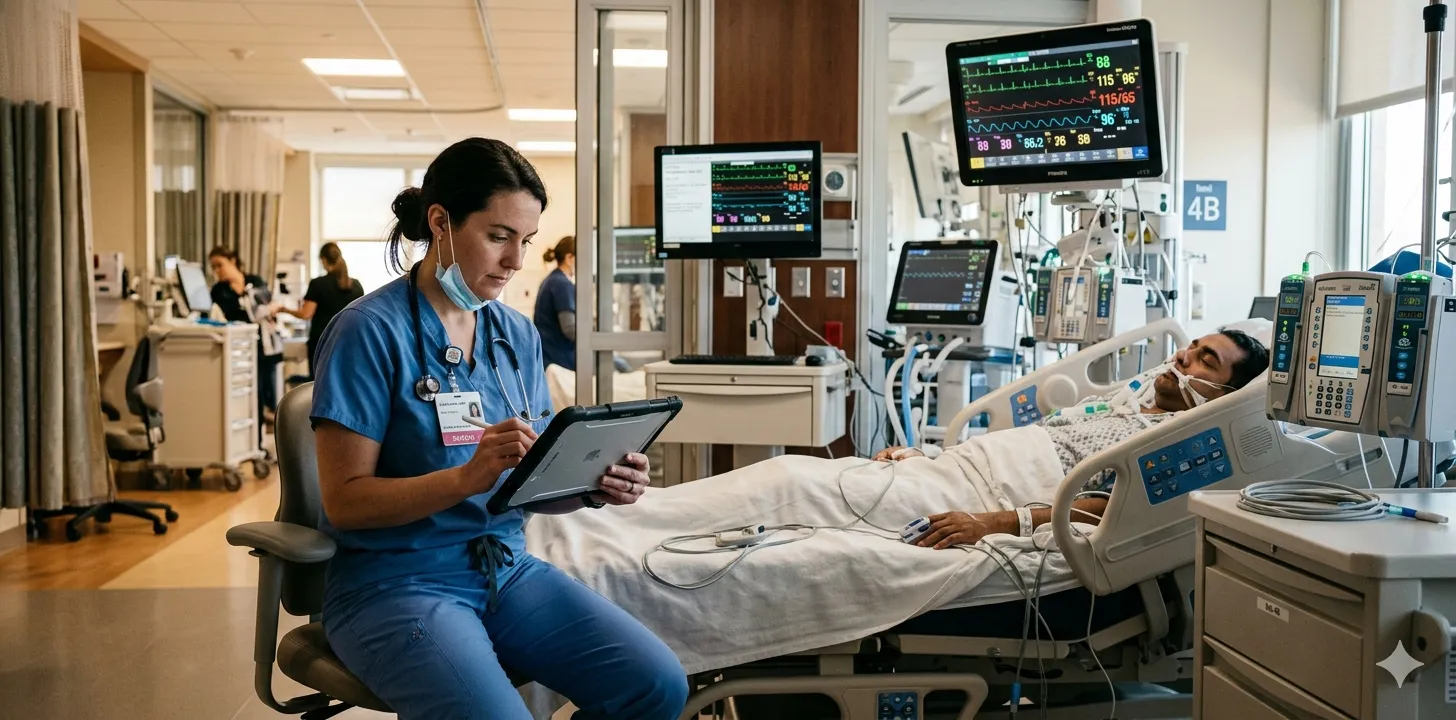
The Real Cost of Documentation Inefficiency
Before addressing solutions, it is worth quantifying the problem. The documentation burden in intensive care is measurably worse than in most other clinical settings because of the sheer volume and complexity of data generated per patient per day.
| Metric | Typical ICU Reality |
|---|---|
| Physician time spent on documentation per shift | 40–50% |
| Average time to write one ICU discharge summary | 1.5–3 hours |
| Daily data points generated per ICU patient | 200–1,500 |
| Severity scores requiring daily calculation | 1–3 (SOFA, APACHE II, GCS) |
| Discharge summaries completed within 24 hours | 30–50% at many institutions |
| Clinician burnout attributed partly to documentation | 55–60% of intensivists |
The downstream consequences extend beyond physician fatigue. Delayed documentation leads to incomplete handoffs. Incomplete handoffs lead to clinical errors. Rushed summaries lead to rejected insurance claims, weakened medicolegal defence, and degraded data for quality improvement.
The goal is not to document less — it is to document smarter. Every strategy in this guide aims to maintain or improve documentation quality while reducing the time and cognitive effort required to produce it. Cutting corners on content is never the answer; cutting waste from the process always is.
Strategy 1: Structured Templates Over Free-Text
The single most impactful change an ICU can make to reduce documentation time is switching from free-text notes to structured templates. Structured documentation forces completeness, reduces cognitive load, and dramatically accelerates both the writing and the reading of clinical notes.
Why Free-Text Is Slow and Error-Prone
Free-text documentation requires the clinician to recall, organise, and compose every element from scratch. With no prompts and no structure, key elements are routinely omitted — not because the clinician does not know the information, but because the blank page offers no reminder.
A study in the Journal of Critical Care found that structured ICU discharge templates reduced documentation gaps by 40% compared with free-text summaries. The structured group also completed documentation faster, because the template provided the framework — the clinician’s job was to fill it, not to build it.
What a Good ICU Template Looks Like
An effective daily ICU note template captures:
- Vitals summary — HR, BP, MAP, SpO₂, temperature, RR (fields, not prose)
- Respiratory status — ventilator mode, FiO₂, PEEP, tidal volume, P/F ratio, or supplemental oxygen details
- Cardiovascular — vasopressor type and dose (in µg/kg/min), fluid balance
- Neurological — GCS (E+V+M), sedation score (RASS), pupil reactivity
- Renal — creatinine, urea, 24-hour urine output, RRT status
- Hepatic/Haematological — bilirubin, platelet count, coagulation parameters
- Infectious disease — current antibiotics, culture results, inflammatory markers (CRP, procalcitonin)
- Nutrition — route, target and actual intake
- Procedures — any performed that day
- Clinical assessment — free-text field for clinical reasoning, plan changes, and family discussions
- Severity score — SOFA (auto-calculated from above values where possible)
The structured fields take 3–5 minutes to complete. The free-text assessment — where clinical reasoning lives — takes another 2–3 minutes. Total daily documentation time per patient: under 10 minutes, versus 20–30 minutes for an unstructured note that is likely less complete.
Design your template around the data needed for the discharge summary. If your daily notes capture vitals, medications, procedures, severity scores, and clinical assessments in structured fields, the discharge summary at the end of the stay becomes an assembly task — not a reconstruction from memory.
Template Implementation Tips
- Start with paper if needed. A printed structured form is better than no structure at all. Digital is better, but do not let the absence of an EHR stop you from using templates.
- Mandate the template. Voluntary adoption fails. If the structured template is optional, clinicians under pressure will revert to free-text shortcuts. Make the template the standard.
- Iterate quickly. The first version of your template will have problems. Review it after two weeks, remove fields nobody uses, add fields people keep writing in the margins.
- Include smart defaults. For stable parameters (e.g., “no new procedures,” “nutrition unchanged”), allow single-click confirmations rather than re-entry.
Strategy 2: Prospective Documentation During Rounds
One of the most common sources of documentation inefficiency is retrospective charting — finishing rounds, then sitting down to document from memory what was discussed and decided. This doubles the cognitive work: you process the clinical information once at the bedside and again at the workstation.
The Prospective Approach
Document during or immediately after each patient encounter on rounds. With a structured template (Strategy 1), this means filling in the fields as you assess the patient — vitals from the monitor, ventilator settings from the machine, vasopressor doses from the infusion pump, GCS from the examination.
The clinical assessment and plan are dictated or typed immediately after the bedside discussion, while the reasoning is fresh.
| Approach | Average Documentation Time per Patient | Completeness |
|---|---|---|
| Retrospective (after all rounds) | 20–30 minutes | Lower — recall bias, omissions |
| Prospective (during/after each patient) | 5–10 minutes | Higher — real-time capture |
Prospective documentation is not just faster — it is more accurate. A vasopressor dose recorded at the bedside is the actual dose. A vasopressor dose recalled two hours later may be the dose from the previous shift. In medicolegal and insurance contexts, contemporaneous documentation carries significantly more weight than retrospective entries.
Making It Work in Practice
- Use a mobile device. A tablet or smartphone with the documentation template allows bedside entry without returning to a desktop workstation.
- Delegate structured data entry. A trainee, nursing colleague, or clinical assistant can enter vitals, ventilator settings, and lab values into the template while the consultant focuses on clinical assessment. The consultant reviews and adds the clinical reasoning.
- Batch the thinking, not the data. Enter objective data in real time. Write the clinical assessment immediately after each patient. Do not accumulate a backlog of patients to document “later.”
Strategy 3: Delegate Non-Physician Documentation Tasks
Not every element of ICU documentation requires a physician’s expertise. Significant time savings come from identifying which documentation tasks can be safely delegated — and to whom.
What Can Be Delegated
| Task | Can Be Delegated To | Physician Role |
|---|---|---|
| Vital signs entry | Nursing staff, clinical assistant | Review and verify |
| Lab value transcription | Junior doctor, data entry staff | Review |
| Ventilator parameter recording | Respiratory therapist, nurse | Review |
| Fluid balance calculation | Nursing staff | Review |
| Severity score calculation | Automated system, junior doctor | Verify and interpret |
| Procedure note (initial draft) | Trainee who performed the procedure | Review and co-sign |
| Medication reconciliation | Clinical pharmacist | Review and approve |
| Family meeting documentation | Social worker, trainee present at meeting | Review and co-sign |
The physician’s irreplaceable contribution is clinical reasoning — the assessment, the differential, the plan, and the interpretation of data in context. Everything else is data transcription, calculation, or structured recording that others can perform with appropriate training and oversight.
Audit your own documentation time for one week. Track how many minutes per patient you spend on data entry (vitals, labs, vent settings) versus clinical reasoning (assessment, plan, decision rationale). Most clinicians find that 60–70% of their documentation time is data entry — work that does not require their medical degree.
Building a Documentation Team
In high-volume ICUs, consider a dedicated documentation support role — a clinical assistant or scribe whose primary responsibility is structured data entry. This person:
- Enters vitals, ventilator settings, lab values, and medication doses into the structured template before rounds
- Accompanies the team on rounds to capture real-time changes
- Drafts procedure notes for consultant review
- Maintains fluid balance and severity score tracking
The consultant’s documentation is then reduced to the clinical assessment, the plan, and the review signature — a task that takes 2–3 minutes per patient instead of 15–20.
Strategy 4: Batch Processing for Repetitive Tasks
Certain documentation tasks are repetitive across patients and benefit from batch processing rather than individual handling.
Severity Score Calculation
Manually calculating SOFA scores for every patient every day is one of the most time-consuming repetitive tasks in ICU documentation. Each SOFA calculation requires pulling data from six organ systems and mapping values to scoring thresholds — straightforward but tedious, especially for a 15-bed unit.
Batch approach: Enter all patients’ lab values and clinical parameters first, then calculate scores together — or better yet, use a system that calculates scores automatically from the entered data. Automated SOFA scoring eliminates both the time cost and the calculation errors that plague manual scoring.
Discharge Summary Generation
Writing discharge summaries one at a time, from scratch, for each patient at discharge is the most labour-intensive documentation task in the ICU. A single summary takes 1.5–3 hours when composed manually from scattered records.
Batch approach: If structured daily notes have been maintained throughout the stay (Strategy 1), the discharge summary becomes a compilation task. Better still, AI tools can generate a complete first draft from the structured data — reducing the physician’s role to review and refinement. More on this in Strategy 5.
Medication Reconciliation
Reconciling medications at discharge — checking that the discharge medication list matches the patient’s current prescriptions, noting what was changed and why — is tedious but critical. Clinical pharmacists can batch-process medication reconciliation for all discharging patients, presenting the physician with a pre-populated list for review rather than requiring them to build it from scratch.
Daily notes that build the discharge summary automatically
Rivara Health captures structured clinical data during the ICU stay. At discharge, AI generates the complete summary — ready for review in under 2 minutes.
Strategy 5: AI-Powered Documentation Tools
Artificial intelligence represents the largest single opportunity to reduce ICU documentation time. Current AI tools — particularly large language models — can transform structured clinical data into coherent, comprehensive clinical narratives in seconds. For ICU documentation, the most mature application is AI-generated discharge summaries.
How AI Discharge Summary Generation Works
The process follows a straightforward pipeline:
- Structured data collection during the stay. Clinicians enter daily notes using structured templates (Strategy 1) — vitals, medications, procedures, lab values, severity scores, and clinical assessments.
- AI synthesis at discharge. When triggered, the AI reads the complete structured dataset for the patient’s ICU stay and generates a coherent clinical narrative — covering admission context, clinical course, procedures, medication history, complications, severity score trajectory, and discharge plan.
- Physician review and approval. The clinician reviews the AI-generated draft, makes corrections or additions, and signs off.
The time savings are dramatic:
| Documentation Task | Manual Time | AI-Assisted Time | Reduction |
|---|---|---|---|
| Discharge summary (5-day stay) | 1.5–2 hours | 5–10 minutes (including review) | ~90% |
| Discharge summary (14-day stay) | 2.5–3 hours | 10–15 minutes (including review) | ~90% |
| Death summary | 2–3 hours | 10–15 minutes (including review) | ~85% |
| Daily severity scoring (15-bed unit) | 45–60 minutes | Near-zero (automated) | ~95% |
For a comprehensive exploration of AI in critical care documentation, see our complete guide to AI in ICU documentation.
AI-generated summaries are drafts, not final documents. The physician remains the author of record and bears responsibility for accuracy. The value of AI is in eliminating the mechanical assembly work — consolidating 14 days of structured data into a coherent narrative. The clinical thinking, the emphasis, and the judgment remain entirely human.
Why Structured Input Matters for AI Quality
The quality of an AI-generated summary is directly proportional to the quality of the structured input. An AI working from complete, structured daily notes — where vitals, medications, procedures, and severity scores are captured in discrete fields — produces summaries that are typically more complete and more consistent than manually written ones.
An AI attempting to generate a summary from fragmented free-text notes, illegible handwriting, or scattered EMR entries will produce unreliable output. This is why Strategies 1–4 are prerequisites, not alternatives, to Strategy 5. AI amplifies the quality of whatever documentation system it sits on top of.
Beyond Discharge Summaries
AI documentation tools are expanding beyond summary generation:
- Automated severity scoring — SOFA, APACHE II, and GCS calculated automatically from structured inputs
- Real-time documentation prompts — flagging missing elements in daily notes (“FiO₂ not recorded — needed for respiratory SOFA calculation”)
- Clinical coding — suggesting ICD-10 and procedure codes from the documented clinical narrative
- Trend detection — identifying patterns across days of data that individual daily notes might not make obvious (gradual decline in P/F ratio, rising creatinine trajectory)
AI hallucination — generating plausible-sounding but fabricated clinical details — is a known risk with large language models. This risk is substantially lower when AI generates from structured inputs (where every output statement can be traced to a specific data point) versus free-text interpretation. But it is not zero. Physician review is non-negotiable.
Strategy 6: Voice Dictation for Clinical Reasoning
While structured templates handle objective data efficiently, the clinical assessment and plan — the section that requires medical reasoning — is often the bottleneck. Many clinicians think faster than they type, making voice dictation a natural fit for this narrative component.
Modern Voice Dictation Options
Voice dictation technology has improved dramatically. Current options include:
- Smartphone built-in dictation — Available on every modern phone, adequate for short clinical notes, free
- Medical-grade dictation software — Trained on medical terminology, higher accuracy for clinical language, handles drug names and abbreviations
- AI-powered ambient documentation — Emerging technology that listens to clinical conversations and generates structured notes (still in early deployment)
Practical Tips for Voice Dictation in the ICU
- Dictate the assessment and plan only. Objective data (vitals, labs, vent settings) is faster to enter via structured fields. Dictation is for the narrative reasoning — the part that is uniquely yours.
- Use a consistent verbal structure. “Assessment: [problem]. Plan: [intervention]. Rationale: [reasoning].” Consistency makes both dictation and subsequent editing faster.
- Edit immediately. Voice-to-text accuracy for medical terminology is 90–95% with modern tools. Review and correct while the clinical context is fresh — not hours later.
- Dictate in a quiet space. ICU background noise (alarms, ventilators, conversations) degrades dictation accuracy. Step away from the bedside if possible, or use a noise-cancelling microphone.
Combine voice dictation with structured templates for the fastest workflow: enter objective data into structured fields (2–3 minutes), then dictate the assessment and plan (1–2 minutes). Total time per patient: under 5 minutes for a daily note that is both complete and clinician-authored.
Strategy 7: Standardise Your Documentation Vocabulary
Inconsistent terminology is a hidden time sink. When every clinician describes the same clinical finding differently — “haemodynamically stable” versus “stable BP” versus “normotensive off pressors” — both writing and reading take longer. Standardised vocabulary reduces decision fatigue during documentation and improves comprehension for everyone who reads the notes downstream.
Areas Where Standardisation Helps Most
- Ventilator weaning status — Define standard terms: “ready for SBT,” “passed SBT,” “failed SBT (reason),” “extubated,” “post-extubation stridor”
- Vasopressor status — Always document as agent + dose in µg/kg/min, not mL/hr
- Neurological status — GCS components (E+V+M), not just the total
- Infection status — Current antibiotic day count (e.g., “Day 5/7 of meropenem”), culture status, source control status
- Goals of care — Standardised categories: “full escalation,” “ceiling of care defined (specify),” “comfort measures”
When the vocabulary is agreed in advance, the clinician does not need to compose phrasing from scratch — they select the appropriate standard term and fill in the specific values. This is faster, more consistent, and more useful for downstream readers.
Strategy 7: Optimise Your Documentation Environment
The physical and digital environment in which documentation happens affects speed more than most clinicians realise.
Digital Environment
- Reduce clicks. Every unnecessary click, dropdown, or screen transition adds seconds that compound across dozens of patients and shifts. Audit your documentation workflow for redundant steps.
- Use keyboard shortcuts. If your system supports them, learn the shortcuts for common actions — moving between fields, inserting standard phrases, signing notes.
- Pre-populate from previous notes. For stable parameters (e.g., same ventilator settings, same vasopressor dose), carry forward previous values as defaults that the clinician confirms or updates. This is significantly faster than re-entering identical data.
- Single sign-on. If clinicians must log in to multiple systems during a single documentation session, the authentication overhead is a meaningful time drain. Push for unified access.
Physical Environment
- Dedicated documentation space. A quiet workstation near (but not in) the patient area, with reliable internet and an ergonomic setup, makes a measurable difference for clinicians completing documentation after rounds.
- Dual monitors. For clinicians who reference lab systems, imaging, or nursing charts while writing notes, a second screen eliminates constant tab-switching.
- Mobile devices for bedside documentation. A tablet at the bedside enables real-time data entry during rounds — eliminating the need to return to a desktop workstation.
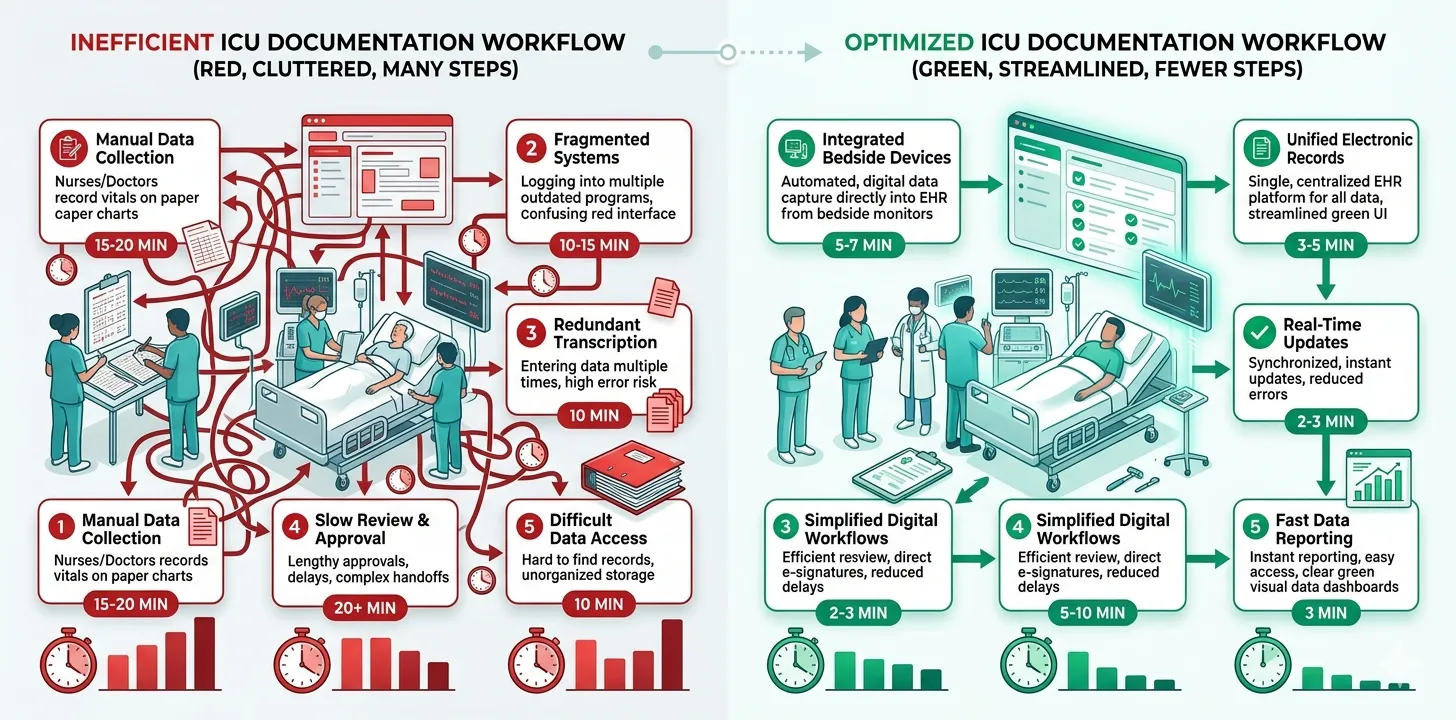
Putting It All Together: A Sample Optimised Workflow
Here is what an optimised ICU documentation workflow looks like when multiple strategies are combined:
Before Rounds (5 minutes per patient)
- Clinical assistant or junior doctor pre-populates the structured daily template with overnight vitals, morning lab values, ventilator settings, and current medication doses
- Automated system calculates SOFA score from the entered values
- The template is ready for the consultant before rounds begin
During Rounds (3–5 minutes per patient)
- Consultant reviews the pre-populated data, corrects any errors, and updates parameters that have changed
- Consultant examines the patient and enters the GCS, clinical findings, and any bedside assessment
- Consultant dictates or types the clinical assessment and plan directly into the template
After Rounds
- No backlog of documentation to complete — each patient’s note was finished at or immediately after the bedside encounter
- Any procedures performed during the day are documented at the time of the procedure (by the performing clinician)
- Consultant reviews and co-signs any delegated documentation (procedure notes, family meeting records)
At Discharge (10–15 minutes per patient)
- AI generates a complete discharge summary from the structured daily notes collected throughout the stay
- Consultant reviews the AI-generated draft, adds clinical nuance where needed, corrects any inaccuracies, and approves
- Final summary is complete within 15 minutes of the discharge decision — not days later
Total daily documentation time per patient: 8–15 minutes (versus 30–60 minutes in a traditional unstructured workflow).
Discharge summary time: 10–15 minutes (versus 1.5–3 hours manually).
The compounding effect is the key insight. No single strategy achieves a 90% reduction in documentation time. But structured templates (30% faster) plus prospective documentation (20% faster) plus delegation (30% less physician time) plus AI-assisted summaries (90% faster for summaries) combine to transform a 4-hour daily documentation burden into under 1 hour — with better-quality output.
What if your daily notes wrote the discharge summary for you?
Rivara Health collects structured ICU data during the stay and uses AI to generate complete discharge summaries — in under 2 minutes. The physician reviews, edits, and approves.
Measuring Your Documentation Efficiency
To know whether your optimisation efforts are working, you need to measure. Here are the metrics that matter:
Primary Metrics
- Time to complete daily note — average minutes per patient per day, measured by self-report or system timestamps
- Time to complete discharge summary — from discharge decision to signed summary
- Documentation completeness score — percentage of required elements present in a random audit of 20 notes
- Documentation timeliness — percentage of discharge summaries completed within 24 hours of ICU discharge
Secondary Metrics
- Insurance claim acceptance rate — the proportion of claims approved without documentation-related queries
- Clinician satisfaction — self-reported documentation burden on a standardised burnout survey
- Error rate — number of factual errors, omissions, or inconsistencies identified during chart review
- Downstream handoff quality — receiving team satisfaction with the completeness of ICU transfer documentation
Benchmarks
| Metric | Typical (Unoptimised) | Target (Optimised) |
|---|---|---|
| Daily note time per patient | 20–30 minutes | 5–10 minutes |
| Discharge summary time | 1.5–3 hours | 10–15 minutes |
| Discharge summaries within 24 hours | 30–50% | >90% |
| Documentation completeness (audit) | 60–75% | >90% |
| Clinician documentation satisfaction | Low | Moderate–High |
Common Pitfalls to Avoid
Pitfall 1: Sacrificing Quality for Speed
The fastest documentation is no documentation — but that is not an option. Every strategy here maintains or improves quality. If you find that a time-saving measure is leading to incomplete notes, missing severity scores, or vague clinical reasoning, fix the process rather than abandoning the goal.
Pitfall 2: Implementing Technology Without Workflow Change
Buying an AI documentation tool and dropping it into an existing chaotic workflow will not work. AI needs structured input. Structured input requires templates. Templates require training and enforcement. The workflow change must come first; the technology amplifies it.
Pitfall 3: Over-Reliance on Copy-Forward
Carrying forward previous values saves time, but uncritical copy-forward creates dangerous clinical records. A note that says “ventilator settings unchanged” when the patient was extubated yesterday is worse than no note at all. Every copy-forward value must be verified against the current patient state.
Pitfall 4: Ignoring the Discharge Summary Until Discharge
If you wait until the day of discharge to think about the discharge summary, you have already lost. The discharge summary is not a separate task — it is the natural output of well-maintained daily notes. A complete ICU discharge summary should assemble itself from the structured data already captured during the stay.
Delayed discharge summaries are a patient safety issue, not just an administrative inconvenience. A patient transferred to the ward without a completed summary is a patient whose receiving team lacks critical clinical context — medication details, pending investigations, red flags for deterioration. Complete the summary before the patient moves.
Getting Started: A Practical Roadmap
For ICU teams ready to reduce documentation time, here is a phased approach:
Phase 1: Foundation (Weeks 1–4)
- Adopt a structured daily ICU note template
- Train the team on prospective documentation during rounds
- Identify non-physician documentation tasks that can be delegated
- Establish documentation time baselines (measure before optimising)
Phase 2: Optimisation (Weeks 5–8)
- Refine the template based on team feedback
- Implement delegation workflows with clear review and co-sign protocols
- Introduce voice dictation for clinical assessment sections
- Standardise clinical vocabulary across the team
Phase 3: Automation (Weeks 9–12)
- Deploy AI-assisted discharge summary generation
- Implement automated severity scoring (SOFA, APACHE II, GCS)
- Optimise the digital documentation environment (reduce clicks, pre-populate, shortcuts)
- Re-measure documentation times and compare to baselines
Phase 4: Continuous Improvement (Ongoing)
- Monthly audit of documentation completeness and timeliness
- Quarterly review of documentation workflows for further optimisation
- Track downstream metrics (insurance approvals, handoff quality, clinician satisfaction)
- Adapt to new tools and technologies as they mature
Medical Disclaimer
This article is for informational and educational purposes only. It does not constitute medical advice, diagnosis, or treatment. Always consult a qualified healthcare professional for clinical decision-making. Rivara Health provides documentation tools — clinical judgement remains with the treating physician.
Conclusion
Reducing ICU documentation time is not about doing less documentation — it is about eliminating the waste in how documentation is currently produced. Structured templates replace blank-page paralysis with guided data entry. Prospective documentation eliminates the recall tax of retrospective charting. Delegation ensures that physician time is spent on clinical reasoning, not data transcription. And AI-powered tools transform hours of manual summary compilation into minutes of review.
The ICU teams that implement these strategies systematically report documentation time reductions of 50–90% — while producing records that are more complete, more consistent, and more defensible than their manually produced predecessors.
The technology is ready. The workflows are proven. The question for ICU teams is not whether documentation can be made more efficient, but how quickly you begin.
Continue reading:
Medical Disclaimer
This article is for informational and educational purposes only. It does not constitute medical advice, diagnosis, or treatment. Always consult a qualified healthcare professional for clinical decision-making. Rivara Health provides documentation tools — clinical judgement remains with the treating physician.
Reduce ICU Documentation Time by 90%
Generate medicolegal-grade ICU discharge summaries in under 2 minutes. Built for Indian hospitals, designed for TPA compliance.